Record any app's sound.
One click.
With a single click, RECKERT records the sound of any app (Chrome, Spotify, Zoom, Logic) or any microphone and audio interface. No virtual drivers, no complicated routing, no needless setup.
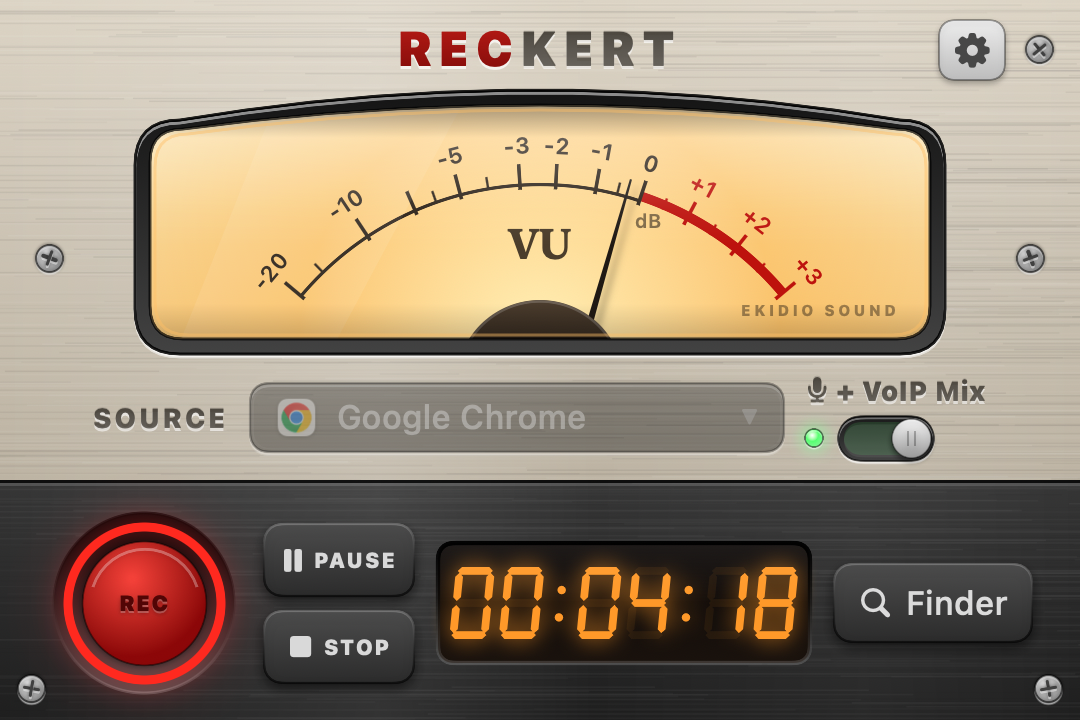
A tape recorder for your Mac
Any app, on its own
Pick Chrome, Safari, Spotify, Zoom or any running app. Only its sound is recorded – notifications and other apps stay out.
Any input
Built-in microphone, USB microphone or audio interface. The list updates itself when you connect a device or an app starts.
VoIP Mix
Your microphone on the left channel, the call on the right. Made for podcasts and interviews.
Analog VU meter
A real needle with true VU ballistics shows the level from the moment you open the app – before you even start recording.
Pause and resume
Pausing keeps the recording in the same file: click Record and the recording and the timer pick up exactly where they left off, while Stop saves the finished take.
Straight to a file
Recordings go straight into the ~/Music/RECKERT folder, dated – or with your own title and notes. The Finder button shows the latest file right away.
Interviews on two clean channels
Choose the call app (Zoom, Meet, Teams, Discord, or the browser) and switch on + VoIP Mix. RECKERT records your microphone on the left channel and the other side of the call on the right.
In your editor, split the stereo file into two tracks: set levels, clean up noise and cut each voice on its own.
Tip: wear headphones, so the call doesn't leak back into your microphone.
Formats and shortcuts
Free download